





The 3CX Call Flow Designer (CFD) introduces a wizard-driven, drag and drop functionality to parse XML and JSON responses. This is just one of the many multi-functional components available within the CFD to extend 3CX Phone System’s capabilities. The new update also boosts efficiency with the introduction of context-aware help shortcuts.
Abracadabra Parse JSON/XML!
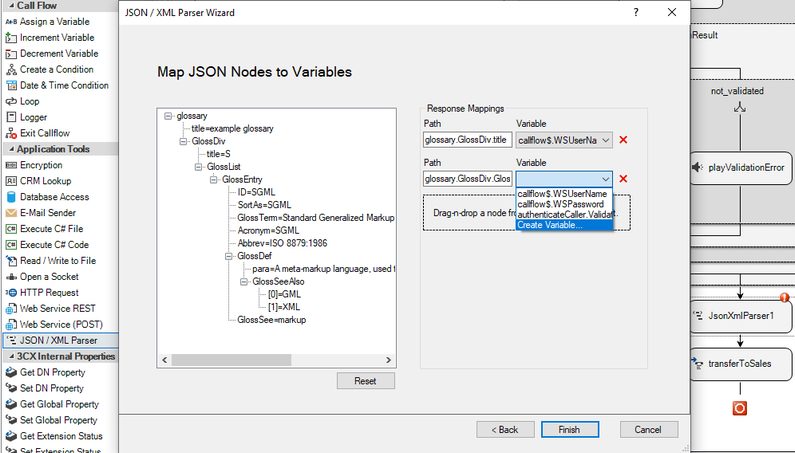
The new CFD steps-up its support for the two most popular web data-interchange standards. Through the component’s wizard, you can easily drag-and-drop items onto the panel to map JSON/XML paths to your variables, validating your call flow in no time. You no longer need to go through the tedious process of crafting C# code to parse these formats.
Use the JSON/XML Parser wizard tool to:
- Invoke the web request in real-time during call flow design.
- Parse a sample response, when the request is to be constructed during execution time.
Read our comprehensive component guide and start parsing!
Documentation is Just a KeyStroke Away
All great development tools are backed by solid documentation. The 3CX CFD is no exception, ensuring you get all the documentation you need faster and more efficiently. You can now get access to relevant documentation topics with the new context-aware help shortcuts. Simply select a component and press <F1> or right-click on a component and select "Help", to open up the relevant topic in the CFD's on-line documentation.
How to Download
Download the new 3CX Call Flow Designer or use the built-in “Check for Updates” function to install, and test drive your Call Flow apps with the latest 3CX v16 Update 4 for Windows or Linux:
- Windows: 3CX v16 Update 4
- Linux: 3CX v16 on Debian 9 ISO – choose “Stable” on the “3CX Update Channel” screen.
View the change log and give us your feedback via our dedicated community forum.









 Copyright © 2026