





Includes voicemail transcription previews, number blocking and SMS country‑code restrictions.
Following the beta release of iOS App V5.3, the app is now officially released for production use. This update delivers improved voicemail visibility, better call controls and reinforced SMS policies.
Please note: the features mentioned below are only supported with Version 20 Update 7 onwards.
View Transcription Snippets for Voicemails & Recordings
With transcription enabled, your iOS app now surfaces snippets directly in the call list: voicemails display a brief snippet, and recordings include a short summary.
Tap the transcription icon to access the full text. This helps you quickly gauge the content of messages without listening to them.
Block Numbers from Chat or Recents
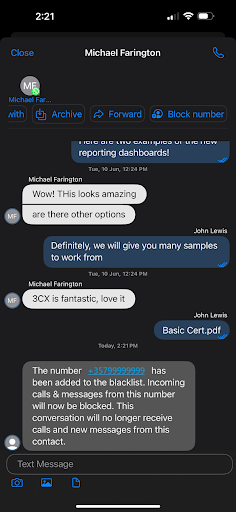
Unwanted calls or messages? You can now block any number directly from chats or your recent call list. This includes external, SMS or WhatsApp contacts. Blocked numbers are added to your CID Blacklist, ensuring no further calls or messages get through.
- From Chats: Open the chat, tap Block number.
- From Recents: Tap the menu button beside a call entry, select Block number and confirm.
Enforce SMS Rules via Allowed Country Codes
SMS sending is now subject to the same Allowed Country Codes restrictions configured for calls. If you try to send an SMS to a number outside the permitted country codes, the message will be blocked and an error message will appear.
Get the Update
Download the latest release from the App Store. For instructions on how to install and provision the 3CX iOS app, see our configuration guide.
View the Changelog for a detailed breakdown of updates in this latest build.
Join Discussions in the Forum
Head over to the dedicated iOS Forum to let us know what you think.
Follow us on X and LinkedIn to stay-up-to date on latest news and feature releases.









 Copyright © 2026