





Improved data transfer for quicker call center and call audio metrics.
Last week's V20 U7 ALPHA had a strong focus on system management for admins. We're following up with the BETA release, which adds a new Supervisor role, as well as faster offloading of call recordings for speedier call center system and call audio metrics. Read on to learn more!
ALPHA Release Recap
Update 7 ALPHA included improvements for system administration, health monitoring, storage integration and analytics export including:
- System Watcher: Native monitoring of core services and system metrics with automatic restart on failure.
- Amazon S3 Support: AWS S3 buckets now available for remote storage (backups, recordings, voicemails, chat).
- Remote Storage Validation: Admin Console alerts for missing/incomplete storage configuration.
- Logging to SQL Databases: Support added for MySQL and Microsoft SQL Server (in addition to PostgreSQL, BigQuery).
- External Metrics Offloading: Offload system and call quality metrics for long-term analysis.
- Encrypted Backups: Optional encryption added in Backup & Restore V2, with performance improvements.
Update 7 BETA Features & Fixes
New Features
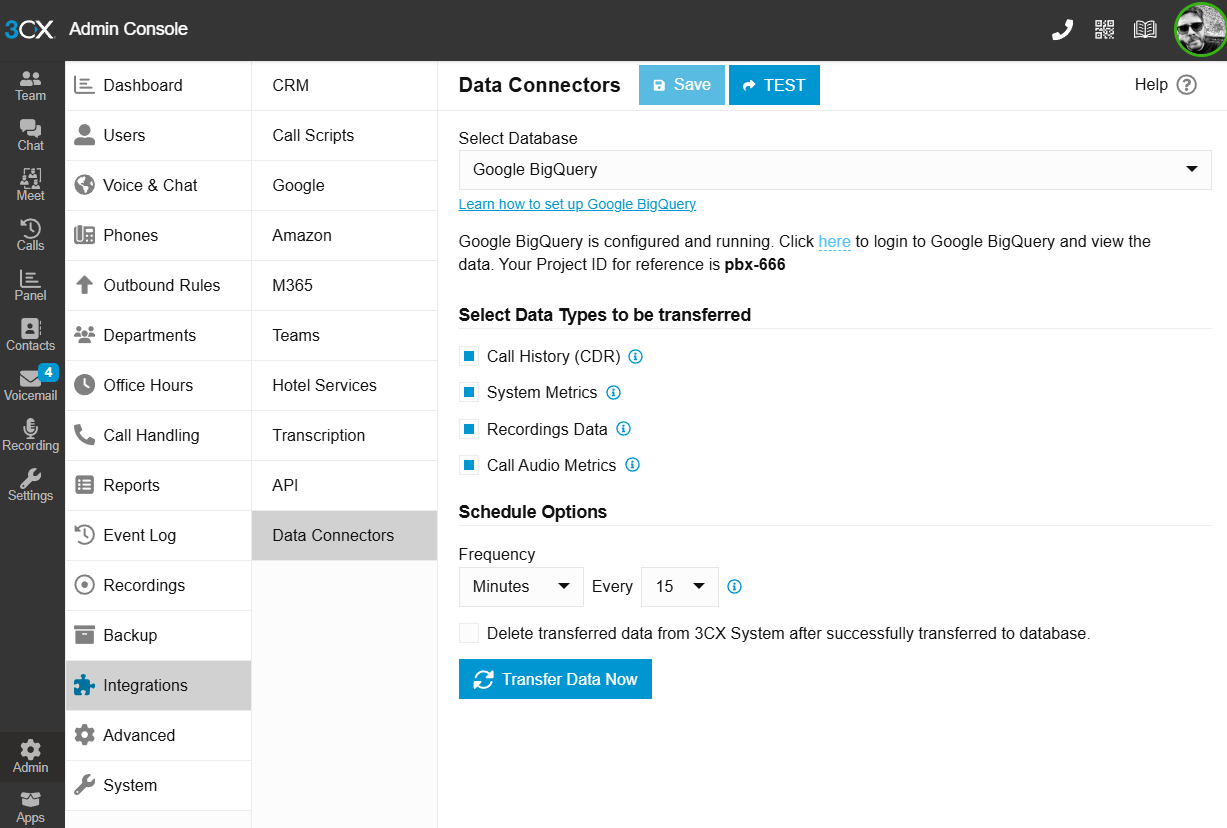
- The Schedule Options in Data Connectors includes a new frequency “Minutes” allowing the transfer of data every 15 or 30 minutes for quicker call‑center, system and call audio metrics.
- A new supervisor role has been added letting supervisors view reports, manage departmental call handling without the need to give them more rights.
Bug Fixes
- Extension statistics call count multiplied by rename operations.
- Schedule options were not applied after the restore.
- Deadlock when purging large volumes of voicemails.
- Fixed Receptionist role by enabling back the option to Override Office Hours.
- Fixed various memory leaks.
- Updated Dstny FR Template.
- Updated Drei SIP Connect Template.
- Updated 3C1B Telekom Template.
- Improved Error Message.
- Improved multiselection combo box in Reports.
- Fixed restore failing with exception "column "duplicated" of relation "cl_calls" does not exist".
View the complete changelog here.
How to Upgrade to Update 7 BETA
- Log in to the Admin Console
- Navigate to System > Updates
- Select Update 7 BETA and click Download
⚠ Important: The BETA version should be installed for evaluation purposes only. It is not recommended for production systems.
Join the Discussion in the Forum
Join the V20 discussion in our dedicated Partner or Customer Forums. Follow us on X and LinkedIn to stay-up-to date on latest news and feature releases.









 Copyright © 2026