Prepare your 3CX for the V20 Beta release.
Update 9 - one of the last updates for V18. With V20 Beta just around the corner, the main function of Update 9 is to prepare your 3CX installation for the upcoming Version 20 release. With this in mind, we highly recommend you begin your V20 preparations by installing Update 9 now.
Don’t Forget! Set your System Owner
V20 requires at least one user with the “System Owner” role assigned. This user must have a dedicated email address that is not used for any other extensions. If there is no System Owner assigned, a tool tip message will be displayed prompting you to set one.
Upgrading to V20 Beta
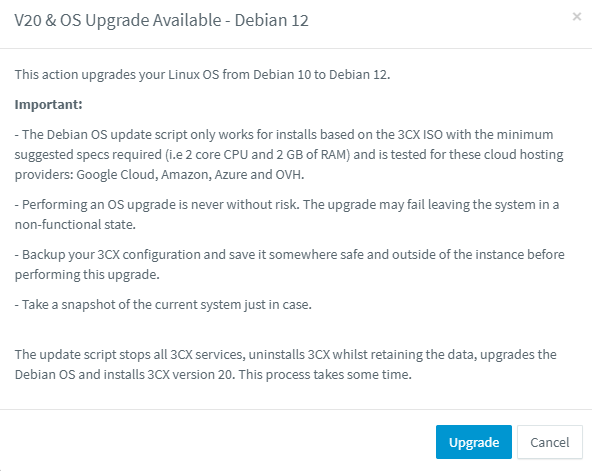
Once a System Owner has been set, you’re ready to upgrade to Version 20 Beta. Take a full backup before you do this.
Your system will be upgraded from Debian 10 to Debian 12. This process will only succeed if you have not made any changes to the Debian install. If you have made changes, it will fail and you need to take a backup, install and restore. To upgrade follow these steps:
- Login to the Management Console
- Go to the updates node
- Click “Upgrade”
Other Changes
The issue with not deleting local files after archiving recordings to SFTP/FTP has been fixed.
New VoIP Providers
We've also added new Provider Templates and updated existing ones:
- Amazon Chime Voice Connector (New)
- Beeline MPBX Account (New)
- VoiceMeUP (Updated)
- Vocus (Updated)
- unyc (Updated)
- Beeline MPBX IP-Based (Updated)
- Reventix (Updated)
- UPC S. GmbH (Updated)
Get V18 Update 9
From the admin console click on the latest update: "New V18.0 Update 9 Beta."
View the complete changelog here.
Stay Informed
Let us know your thoughts in our dedicated Partner or Customer Forums.
You may also hit the follow button on our X and LinkedIn pages to stay-up-to date on further developments.