





Stay alerted to critical system issues with native health monitoring.
V20 Update 7 Final is ready for production following the Alpha, Beta, RC, RC 2 and RC3 cycle. It strengthens system reliability with System Watcher for service monitoring and auto-recovery, plus faster and encrypted Backup & Restore V2. AWS S3 support expands remote storage options for backups, recordings, voicemails and chats.
Update 7 also adds MySQL and Microsoft SQL Server support for external logging and analytics, and introduces a Supervisor role for call center oversight without the need for full admin rights. Faster data offloading, key stability fixes and enhanced integrations make this one of the most admin-focused releases to date.
3CX System Watcher - Native Health Monitoring
3CX System Watcher is now built into the platform, continuously monitoring the health of the PBX. Core services are checked in real time, and if one fails, it is automatically restarted to minimize downtime.
System Watcher also tracks system resources - CPU, memory, disk and network usage and raises alerts when thresholds are exceeded. These alerts are visible in the Admin Console under Admin > System > Alerts and are also sent via email, helping administrators act quickly before performance issues affect call quality.
By combining service recovery with proactive alerts, System Watcher reduces operational risk and gives administrators greater confidence in the stability of their deployment.
Amazon AWS S3 Support for Remote Storage
Amazon AWS S3 is supported as a remote storage provider, alongside Google Cloud Storage and Microsoft SharePoint. Admins can configure multiple AWS regions and buckets directly from the Admin Console, making setup straightforward and adaptable to infrastructure needs.
S3 can be used to store:
- Backups
- Voicemails
- Recordings
- Chats
- Faxes
This expansion provides greater flexibility for compliance and long-term storage, particularly in larger deployments.
Notifications for Non or Partially Configured Remote Storage Setup

To prevent data loss, the Admin Console displays a banner when remote storage is missing or only partially configured. The alert remains until configuration is complete and includes direct links to the relevant settings.
Administrators can configure storage under System > Storage, enabling data types such as backups, chats, recordings, and voicemails. Remote storage will soon be mandatory for all 3CX Hosted systems, setup will be required.
Backup & Restore V2 - Faster and Encrypted
Backup & Restore V2 improves both security and performance. Backups can be encrypted to protect sensitive data during transfer and storage, while operations run up to 50% faster. These enhancements make it easier to safeguard critical information and reduce the time needed for recovery or migration, especially on high-volume systems or those with large recording archives.
External Database for Metrics & Recordings
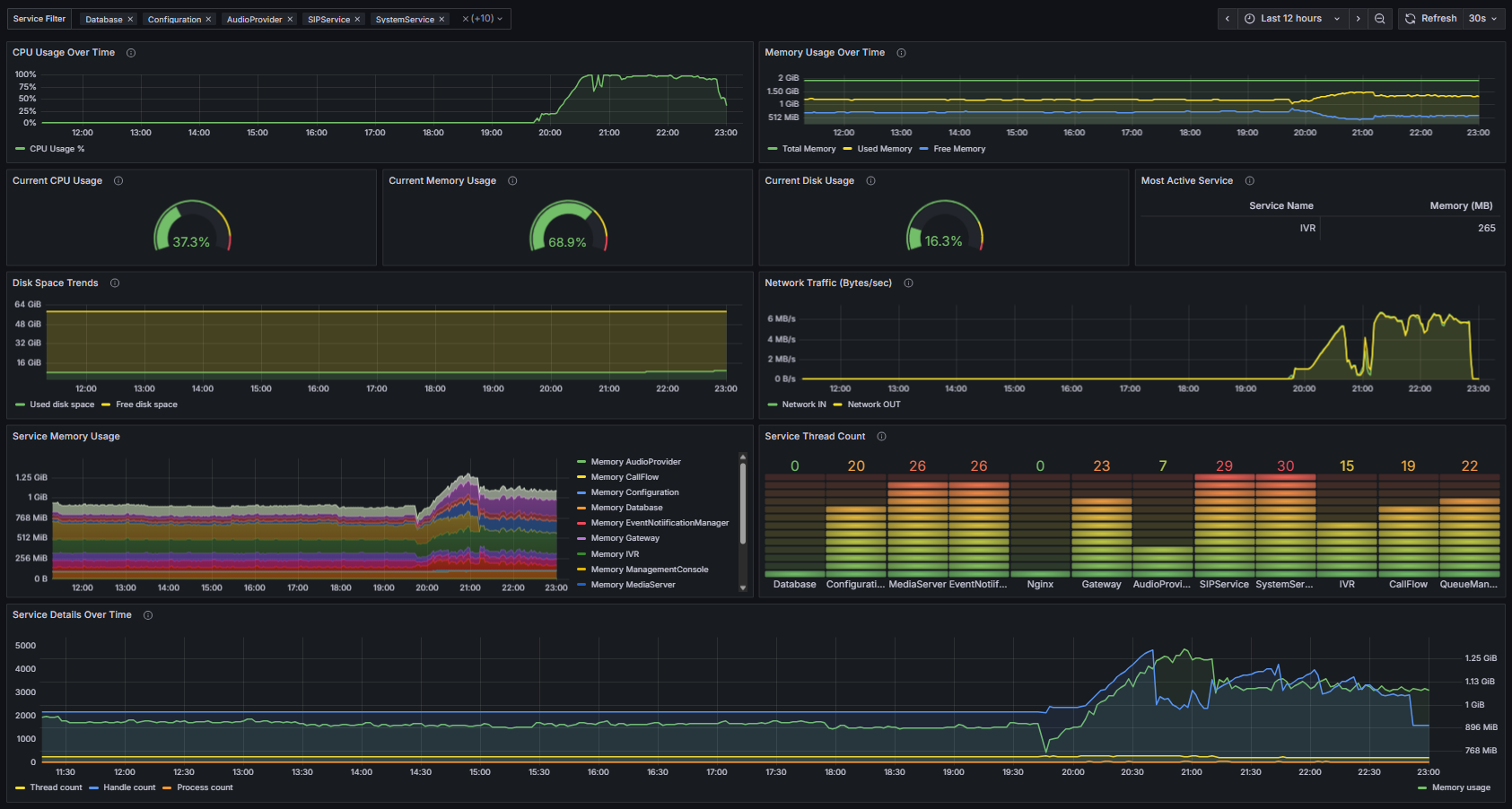
Reporting and analytics are expanded with support for MySQL and Microsoft SQL Server, in addition to PostgreSQL and Google BigQuery. This gives administrators more options for building external data warehouses and integrating with BI tools such as Grafana and Power BI.
Three new data connectors are available for 16SC+ systems:
- Recordings - offload and archive call recordings externally for long-term storage and transcript search.
- System Metrics - export CPU, memory, disk, and network usage to track performance and resource trends.
- Audio Quality Metrics - extract MOS, jitter, and packet loss values to monitor call quality over time.
These connectors extend access to historical data beyond the system’s built-in retention limits. By offloading system metrics and call data to external databases, administrators can build scalable archives, analyze long-term performance and create detailed dashboards with tools like Grafana or Power BI.
New Supervisor Role
A dedicated Supervisor role provides better oversight for call centers and departmental operations. Supervisors can access reports and manage queue handling, improving day-to-day team management without requiring full admin rights.
This role preserves safe system administration, clear accountability and enhanced queue control in larger deployments.
Faster Data Transfers
Data Connectors include a new “Minutes” frequency option, allowing exports every 15 or 30 minutes instead of the previous hourly minimum.
This enhancement provides near real-time visibility of call center statistics and audio quality metrics. Supervisors and reporting tools receive faster insights into performance, enabling more responsive decision-making and more accurate monitoring of live operations.
Fixes & Improvements
Stability and functionality issues were previously addressed and tested in RC 1, 2 & 3.
View the complete changelog here.
Other Features
We’re continuing to work on other feature improvements with more details coming in future releases. Here’s the recap:
- DATEV Integration: For 8SC+ Enterprise licenses, DATEV integration can be managed directly from the Admin Console.
- 3CX Transcription includes: On-Demand Call Transcription, 3CX Summary & Sentiment
- Enhanced Reports: Better filtering (multi-select), DID search for inbound reports and new filters.
- Secure PostgreSQL Data Connector: Improved security measures for your PostgreSQL Data Connector.
- Streamlined Provisioning: BLF, Hot Desking Login BLF support and user import/export options.
- Core System Updates: PostgreSQL 15.13, Bootstrap, marked RTP traffic as high priority (TOS 46) and moved to .NET Core 8.0.17.
- SBC Management Returns: Full, granular management of your SBCs
- SMS/MMS E.164 Formatting: A new SmsPrefix parameter ensures proper E.164 number formatting for US/CA providers.
- Spam SMS Blocking: Blacklisting numbers or blocking messages by country code to boost security.
- New Yealink T7 Series Support: Official support is added for the latest Yealink T73U/W, T74U/W, T77U, T85W, and T87W phones
Get Started With Update 7 Final
To try out these new features, upgrade to V20 Update 7 Final.
- Log in to the Admin Console.
- Navigate to System > Updates.
- Select Update 7 and click Download.
For a fresh, on-premise installation:
- 3CX Windows Installer.
- 3CX Windows Installation Guide.
- Download the 3CX ISO.
- 3CX Linux Installation Guide.
Start a new cloud deployment here.
Join the Discussion
Join the V20 discussion in our dedicated Partner or Customer Forums. Follow us on X and LinkedIn to stay-up-to date on latest news and feature releases.









 Copyright © 2026