





AI call screening and shared voicemail.
Following the successful release of the previous Beta we’re now rolling out Beta 2 of the 3CX iOS App V5.4. This update introduces AI call screening and adds shared voicemail visibility for queue and ring group agents. Read on for details!
AI Call Screening
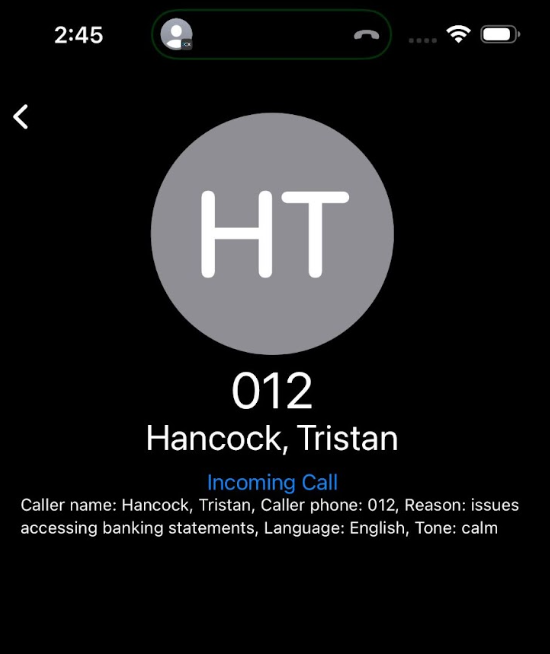
With Version 20 Update 8 we introduced the AI Receptionist. iOS Beta 2 now brings intelligent call screening to the 3CX iOS client. When a call is handled by the AI agent, users will see a clear summary of who is calling and why. This information is captured automatically before the call reaches your team.
Due to current Apple limitations within CallKit, users will need to open the 3CX app itself to view this call screening information. Future iOS updates will allow us to improve this behaviour and display the screening summary more seamlessly.
Note: This feature requires Version 20 Update 8 Alpha.
Shared Voicemail for Queues and Ring Groups
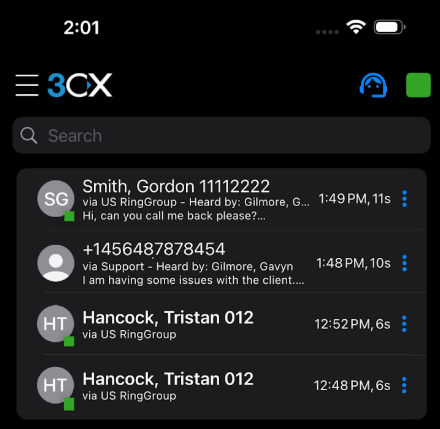
Agents assigned to a queue or ring group can now view voicemail messages left to that group directly from the iOS app. Each voicemail entry includes:
- Via Queue or Ring Group: Showing the number called and the route it passed through
- Heard by: Indicating which agent first opened and marked the message as read
This ensures teams can manage shared mailbox activity with more clarity and avoid multiple agents responding to the same message.
Note: Requires Version 20 Update 8 Beta (coming soon).
View the changelog for a detailed breakdown of updates and fixes in this latest build.
Compatibility Notice
This Beta release is no longer compatible with 3CX Version 18. Systems running V18 will not connect with the new iOS client. For more information please refer to the V18 End of Support announcement on our website.
Get Involved
Join the iOS TestFlight program to test this beta and provide direct feedback to our development team.
For instructions on how to install and provision the 3CX iOS app, see our configuration guide.
iOS Forum
Head over to the dedicated iOS Forum to let us know what you think.
Follow us on X and LinkedIn to stay-up-to date on latest news and feature releases.









 Copyright © 2026