




With the latest version of 3CX WebMeeting, users now have the option to use advanced meeting room moderation options. These options give you the ability to assign user roles to each web meeting participant as well as accept or reject users who try to connect to your meeting. Additionally, connected users can be removed from an ongoing meeting. How it Works: Giving permissions t [...]
Continuing the trend we started in 2016 with multiple CRM integrations available with 3CX V15, we're kick-starting 2017 with yet another. Now you can easily integrate amoCRM with 3CX V15 too. The configuration is easy and straightforward and offers many benefits to users of 3CX and amoCRM, these being: Click to Call – Launch calls straight from amoCRM via 3CX Call Pop-ups – The [...]
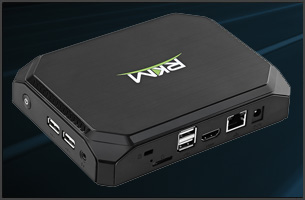
3CX V15 now supports deployment to a MiniPC so that you create a 3CX PBX Appliance. Using a MiniPC you can put together a low cost, yet reliable appliance that can be used in smaller offices where no server is available. It’s important to note that the difference between 3CX and other PBX appliances is that you will use standard hardware and a standard operating system (Debian [...]

This integration is no longer available. We just can't give you enough CRMs that integrate out of the box with 3CX. Continuing our list of CRMs that can be integrated with 3CX, our latest addition is Insightly. And again, integrating 3CX with Insightly is super easy and takes hardly any time at all! When integrating your PBX with your CRM application you achieve many benefits s [...]

Hi there 3CX Partners and End Users! I hope you’re all having a good start to the week. My morning began with a “most loved” task of mine: reporting. While validating some topics and categories within our ticketing system, I came across a rather frequently asked question / statement from our customers: My Provisioning files are not generated or My Provisioning files are not up [...]

Yes, you read correctly! We have added yet another CRM integration to the list of out of the box integrated CRMs that come with 3CX V15 PRO. Just like all the other integrations we have brought to you in the last two months this one is also straightforward and super-easy! By choosing to integrate your PBX with your CRM application you achieve increased productivity in addition [...]
Following the Freshdesk, Nutshell, EBP and DATEV integrations with V15 we've also added Zendesk to the list. The configuration is easy and straightforward and offers many benefits to users of 3CX and Zendesk, these being: Click to Call - Launch calls straight from Zendesk via 3CX Call Pop-ups - The customer record is brought up to you automatically during a call Call Journals - [...]

When we promise we deliver. During the launch of 3CX V15 we promised you more CRM integrations and as you've noticed we're delivering on our promise. In the last two months we've added Freshdesk, Nutshell, EBP and now DATEV has been added to the list; and be certain we'll be adding more shortly. By integrating 3CX PRO with DATEV CRM users achieve the following benefits: Click t [...]
This integration is no longer available as of May 29th 2019. We've already added Freshdesk and Nutshell to the list of CRMs that are integrated with 3CX V15 and EBP is our latest addition, rest assured that more are to follow. By integrating 3CX with your CRM system you can boost your agents’ productivity and make their work so much easier. When using this plugin, users can int [...]

In previous versions of 3CX the phone system was in charge for multi port gateways (ISDN or FXO) to hunt for the PSTN ports. However, after the firmware of the vendors became more capable, 3CX abandoned the idea of multi trunks per single gateway and instead let the gateway build hunt groups over all available ports. The result is a faster outbound call processing and simplifie [...]

 Copyright © 2026