February 17, 2012 – 9:22 pm | No Comment

3CX Phone System Multi Tenant enables resellers to offer a hosted PBX service
London UK, February 17 2012 – 3CX, international telecommunications developer of Windows-based PBX software, today announced the release of 3CX Phone System Multi …

Read the full story »
Releases

3CX Product Releases

VoIP How To

Technical tips to run your VoIP PBX more efficiently

Events

3CX Trainings and Webinars around the world

Docs & FAQ

3CX Documentation how to and FAQ

Phone configuration

3CX, Aastra, Cisco, Yealink, Grandstream, Polycom configs

Home » Featured, Releases

3CX Phone System v10 Beta 1 available!

Submitted by on March 18, 2011 – 2:58 pm35 Comments

We are pleased to announce the availability of the beta of the new version 10. V10 is a major release, with an all new – Silverlight based – user portal, 3CX MyPhone. The new 3CX MyPhone replaces the 3CX Assistant and the old 3CX MyPhone portal. Everything is now grouped in one easy to use portal.

The new 3CX MyPhone is web based, but can be installed as a desktop application. In this mode it uses the browser in the background but allows the user to resize 3CX MyPhone to their preference, as well as launch it automatically. 3CX MyPhone should also run on Macs.
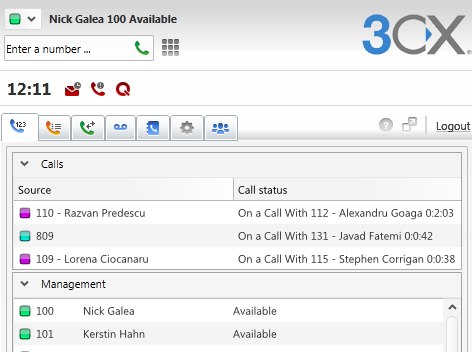
3CXMyPhone-new2

Other features

  • Notification to Windows Event log, 3CX Event Log and optionally by e-mail on key events
  • PnP support for 3CXPhone for iPhone, Android and Windows, Grandstream Executive GXP-21xx and Yealink phones. This means that you can just plug in the phone, assign extension in the management console and the phone will be automatically configured. This eliminates the need to specify the provisioning URL in the phone or via DHCP option 66.
  • Complete support for the new Grandstream GXP-1450, GXP 2100, GXP 2110 and GXP 2120 phones. Requires firmware v. 1.0.1.56 and up.  Note that these phones are still in BETA
  • Support for the Grandstream GXP 3140, GXP 3175 video phones
  • Support for the Yealink VP 2009 video phones
  • Ability to black list IPs
  • Ability to block extensions being registered from outside the network
  • You can configure that particular extensions can not be used outside of the local network
  • Ability to limit extensions registering externally to use tunnel
  • Native 64 bit version (not available in beta)
  • Ability to record prompts via the phone – simply click on prompt, enter extension name and record prompt
  • Reduced memory footprint and elimination of extra service
  • Specify extension group in outbound rules to easily create Class of Service rules

Commercial editions

  • Improved conferencing page in 3CX MyPhone allows for easier setup of conference calls
  • Queue tab in 3CX MyPhone which gives an overview of the status of queues
  • Improved BLF page – now allows provisioning of Speeddials, custom codes
  • Complete G722 support (Requires G722 capable phone)
  • Server will query phonebook to match Caller IDS to a specific name

Limitations of BETA

  • The beta has the call queue tab has the call center features enabled
  • Microsoft Outlook and CRM integration is not finished yet
  • The “bring window to front” feature upon receiving a call is not available
  • Launch of an external application upon receiving a call is not available
  • The hotkey feature to dial a number is not available
  • The ability to configure an outbound rule in 3CX MyPhone for launching of calls is not ready yet
  • Some Inbound and Outbound Caller ID’s are interchanged
  • Automatic changing of status based on office hours and away times is not working yet
  • Chat : Blocking of chat from certain extensions and sound notifications is not available
  • Sorting of extensions by first/last name
  • Launching 3cx phone for calls is not available
  • Triggering a call on a desk phone using http url (http cti)
  • incremental parking
  • Company phone book entries cannot be added at the moment.

IMPORTANT

The provisioning port has changed to port 5000. This means that you must change the provisioning links for the phones to “http://IPADDRESSSERVER:5000/provisioning”. You can do this via DHCP option 66 or by configuring the phones from their web interface. See the configuration guides for more information. Reboot the phones after you have made this change.

Downloads

Please post any questions about the beta to the 3CX Phone System V10 beta forum here.

Use this Beta V10 Demo Key to activate enterprise features: LFMD-4QDR-7OHP-ZZO2

We look forward to your feedback!

35 Comments »

  • [...] Read this article: 3CX Phone System v10 Beta 1 available! [...]

  • Clive Arnold says:

    Is it a typo in the admin manual when it states…

    It is possible to upgrade a 3CX Phone System 8, 7.1 installation to version 10 as follows

    … I’m presuming that version 9 should also have been included in the above statement ?.

  • [...] Visit link: 3CX Phone System v10 Beta 1 available! [...]

  • [...] Here is the original post: 3CX Phone System v10 Beta 1 available! [...]

  • [...] Read more from the original source: 3CX Phone System v10 Beta 1 available! [...]

  • We are very curious about the new version. We will test it instantly. For sale, it is nice to see that enterprise editons will have some pros.

  • Nick and 3CX Development Team,

    This is the way to go. We will be loading the VEr. 10 Beta on one of our lab machines and evaluating it asap.

    Great job!

  • [...] Check out the video here for more details and read the 3CX Blog for additional information: http://www.3cx.com/blog/releases/3cx-phone-system-v10-beta/ Tagged with: 3CX • Release • Update • Version 10  If you enjoyed [...]

  • Awesome!

    Going to try it out right away. :)

    Keep up the great work!

  • JohnCz says:

    Really nice work. I especially appreciate the new 3CX MyPhone which combines the old Assistant and portal.

  • Mazhar says:

    Thank you 3CX team for this … Can’t wait to get the production version the soonest … for now will try the beta in the lab and post any updates

  • nicky says:

    @Clive – Version 9 backups are supported yes no problem.

  • Rigardt says:

    looks very nice
    where do we post bugs to ?
    all ready found 1

  • Nick Borg says:

    @Rigardt On the 3CX Forums – There is a new section for V10. http://www.3cx.com/forums/3cx-phone-system-v10-general-community-led-no-tech-support-36/ – Put proper title and (Bug) near it. We will be actively monitoring this section of the forums.

  • Fábio says:

    Great news!! Does this version already allow for multiple administration logins? Is this planned for v10? Having to share the same username/password among several technicians is not nice…

  • Bluetel says:

    Hi,

    very good plaisure to see v10 will plublish. nice work team.

    I try to import backup from v9 and it’s write “this is not supported backup”… it’s from 2003 to xp…

    tks

  • mr dao says:

    Does 3CX V10 support gateway voip: Eztalk AS4000 ???

  • Rudy says:

    Great work guys.

    Will the “User Pin Code” or “Outgoing Call Code” be implemented on this release?

  • Jeff Grabiak says:

    My 3CX assistant stopped working when I upgraded to Windows 7, is there a patch or should I remove and re-install?

  • Nick Galea says:

    @Rudy – no we do not have such a feature @mr Dao – no we do not support that gateway, only the gateways listed on our support page at http://www.3cx.com/support/ @jeff – i suggest trying out v10! Or else contact our support department.

  • Thorvaldur says:

    Is it possible to se how WallBoard looks like in v10 beta1 in CallCenter or is it not active yet?

  • Adrian Hicks says:

    Get this error regularly when trying to log in to the management console. Only solution seems to be a rebnt happen next time.

    Server Error in ‘/management’ Application.
    ——————————————————————————–

    Index was outside the bounds of the array.
    Description: An unhandled exception occurred during the execution of the current web request. Please review the stack trace for more information about the error and where it originated in the code.

    Exception Details: System.IndexOutOfRangeException: Index was outside the bounds of the array.

    Source Error:

    An unhandled exception was generated during the execution of the current web request. Information regarding the origin and location of the exception can be identified using the exception stack trace below.

    Stack Trace:

    [IndexOutOfRangeException: Index was outside the bounds of the array.]
    Gizmox.WebGUI.Server.Content.ProcessRequest(HttpContext objHttpContext) +4152

    [HttpException (0x80004005): Index was outside the bounds of the array.]
    Gizmox.WebGUI.Server.Content.ProcessRequest(HttpContext objHttpContext) +4467
    System.Web.CallHandlerExecutionStep.System.Web.HttpApplication.IExecutionStep.Execute() +533
    System.Web.HttpApplication.ExecuteStep(IExecutionStep step, Boolean& completedSynchronously) +256

    ——————————————————————————–
    Version Information: Microsoft .NET Framework Version:4.0.30319; WebGUI Version:4.0.30319.1

  • Paul Lukandwa says:

    Nick, this is really great progress and a good growth path for 3CX even in Africa, I am wondering if there are any changes to the Call Accounting. If not, 2 very important features that could be implemented in the next release if not in this one could be;

    -A Call Accounting system that allows certain or all extension users to be assigned call credit monthly or periodic to allow them to call outside extensions and when their quota expires, they cannot call out. A feature to enforce entering the extension Pin before a call could help prevent abuse

    -Another great add could be adding Active Directory authentication for the Management Console and users so Rights levels are tagged to Active Directory accounts assigned at install.

    The new version is a another great leap, Thanks…

  • Paul Lukandwa says:

    Also wondering how CRM Integration is going to be implemented in Version 10…

  • awedio says:

    Short screencast showing 2008R2 Hyper-V Live Migration of 3CX vm.

    There is no downtime or disruption of the active phone call.

    http://www.screenr.com/ezP

  • [...] Featured » 3CX Phone System v10 Beta 1 available! March 18, 2011 – 2:58 pm | 21 Comments [...]

  • Bolkar says:

    What is the name of the webserver that is used in V10?
    We had an issue with the one on V9 and still using V8 because of that.

  • Chad says:

    This is looking nice, will there be an app for the Windows Phone interface with this version, or in the near future?

  • Nick Galea says:

    @Bolkar – IIS or Abyss. Same as V9. We have no reported issues with either, i recommend contacting support…. IIS is built into Windows

  • Nick Galea says:

    @awedio – thank you very much for this screencast!

  • Nick Galea says:

    @Paul – Thanks for your feedback! CRM for Salesforce, Sage, SugarCRM, Dynamics will be a separate install and cost. Call History is being revamped. We have no plans as yet for outbound pin or call credit but there its possible to develop this as a separate module.

  • Ernst says:

    Dear readers, a simple question from a Scouting Group in The Netherlands. Is there a version known for just 1 outside line, unlimited internals (extensions), but all futures enabled?? AND for Free, Please ….. We want to use it at locations where only internal calls are needed. Just one if possible for emergency etc.

  • [...] 3CX Phone System v10 BETA 2 Submitted by Nick Galea on April 13, 2011 – 9:18 pmNo Comment ShareWe have a new build of 3CX Phone System V10 – Beta 2! This build fixes many issues and also adds some features that were missing in BETA 1, most notably Microsoft Outlook integration, Hotkey dialing and the ability to install 3CX MyPhone locally. For a list of new features in 3CX Phone System v10, check out the original beta post. [...]

  • [...] 3CX Version 10 Beta 2 Released By kerryg On April 13, 2011 · Leave a Comment 3CX has posted a beta 2 version of the upcoming 3CX Version 10. There are a bunch of new features and bug fixes and this is starting to look like a really solid upgrade. From the 3CX Website: We have a new build of 3CX Phone System V10 – Beta 2! This build fixes many issues and also adds some features that were missing in BETA 1, most notably Microsoft Outlook integration, Hotkey dialing and the ability to install 3CX MyPhone locally. For a list of new features in 3CX Phone System v10, check out the original beta post. [...]

  • [...] Wir haben eine neue Version des 3CX Phone Systems V10 – Beta 2! Diese Version behebt bekannte Fehler und fügt weitere Funktionen zur Beta 1 hinzu. Die meist auffallenden Unterschiede ist die Outlook Integration, das Wählen per HotKey wenn das 3CX MyPhone lokal installiert worden ist. Alle Neuerungen der V9 zur V10 Beta 1 finden Sie hier noch einmal aufgelistet “Klick Me“. [...]