





We’re excited to announce the release of the new 3CXPhone for iPhone app! 3CXPhone for iPhone plays a big part of 3CX Phone System 12…. and just like the Android client, took a lot of work :-)
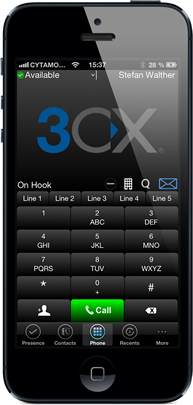 3CXPhone for iPhone supports PUSH Technology, which means 3CX can ‘wake up’ your iPhone or iPad when a new VoIP call comes in. This saves significant battery life as you don’t need to keep the app active. 3CX is the first PBX to provide PUSH, delivering you true mobility! 3CXPhone for iPhone delivers many unified communications features:
- Make and receive VoIP calls via 3CX Phone System 12 from anywhere
- Setup conference calls easily
- See the presence of your colleagues
- Multi Line – manage multiple calls at the same time
- Corporate instant messaging
- Ability to configure call forwarding from your iPhone
- Ability to quickly set your presence status, e.g. available, away, out of the office, etc.
- Centralized call history
- Configure the iPhone client via email in seconds
- Blind and attended call transfers
- Place calls on hold
- Playback voice mail through the client
- iField help links added which provide help for each feature
- Add and delete personal contacts from the phonebook
- Record calls and play them back on the client
To take advantage of the great new features of 3CXPhone for iPhone, you’ll need to have the latest version of 3CX Phone System 12 installed. Update to the latest version by logging in to the 3CX Windows Management Console from Start > All Programs > 3CX Phone System > Windows Management Console and navigate to the 3CX Phone System Updates node > 3CX Service Packs / Updates.
Download 3CXPhone for iPhone!
- Download 3CXPhone for iPhone from the Apple App Store.


Documentation and Links
- Check out the 3CXPhone for iPhone User Manual and the 3CX Phone System 12 User Manual.
- Take a look at the new 3CX Phone System 12 Beta build feature improvements and fixes.
- Give us your feedback on the 3CX Forums and in our 3CX Facebook Page.
- Don't forget to give us a positive review and rating!


